RagPiano.com - Guide to Using MIDI For Ragtime
As you look through this page, keep in mind that a great deal of work has gone into my MIDI recordings over the past few years. Please know that there is more to my work than just MIDI, including many live performances, vocal albums, and high quality digital sound recordings of my MIDI work reproduced on high quality pianos. Your patronage of the products that myself or any of my colleagues that have recordings or music for sale well help perpetuate future high-quality reference sources.
Thank You 
MIDI recordings are all over the web, in mobile phones, video games, etc., and constantly being distributed in other fashions as well. Even though they are no longer supported in most web browsers as of HTML 5 and 2013 standards, they are still in use in many places and have not entirely lost their luster or purpose. But not all MIDI recordings are the same. This is not to say that they are bad; just produced by differing methods that create a wide range of results. What you are looking for while listening to or recording MIDI files may also vary. In no way do I intend to malign or endorse any particular method. Only to help you ascertain what is what. Hopefully it will help you produce the type of MIDI files you would like to represent your work with, and to better determine how other files were produced. It is hard not to inject some of the author's bias or opinion in this, but I will try to note when certain points are more objective than subjective.
MIDI Vs. MP3/M4A: Before we go any further and look into the aspects of MIDI file creation, I would like to address one of the most common misconceptions that I have come across through questions that are asked of me or assumptions that are made about sound files in general. That is The Difference Between MIDI and MP3 (or other audio formats).
MP3/M4A Audio: An MP3/M4A file is a compressed version of a Wave file. Both contain actual digital data representing the frequencies and wave shapes of sounds that have already been recorded through the means of a microphone or other reproduction form. It is to computer audio what a CD is to a CD player or a cassette to a tape player. The content of the file IS sound. That is why vocals and other forms of natural sound can be stored in an MP3 or Wave file. Very little alteration can be done directly to an MP3/M4A file without changing the contents of the file to a state of distortion or non-recognition. Similar formats that stream audio, such as Real, Quicktime or Windows Streaming Media are compressed even more so than even MP3/M4A, but at the cost of further sound degradation.
MIDI: A MIDI file contains data in the form of instructions to tell a MIDI compatible musical reproduction device, such as a sound card or digital piano, what notes to play, how loud, how long, and using which instrument. Even for the best MIDI files, the quality of output is dependent largely on the quality of the device that is reproducing the sound. The sounds are not stored in the MIDI file; rather they live in the MIDI device that is reproducing the sound. MIDI is adaptable in the sense that you can change the type of instrument playing a certain sound. For example, a grand piano can be changed to a honky-tonk piano or a flute to a clarinet. However, standard format MIDI files cannot store voice data or other "live" sounds.
Advantages: In cases where the content needs to be as close to the original as possible, particularly in the case of vocals or "live" sounds, MP3 files are the clear winner. The problem is with bandwidth, or the size of the file. A MIDI file of a piano rag may be around 25k in size, where an MP3 recording of the same rag is typically well over 100 times that. This drastically alters the number of tunes that can be stored in a given server space, as well as the download time for each file. In an instance where a smaller MP3 file is available for faster loading on slower connections, this usually comes with a major loss of fidelity, thus rendering the final sound as highly inferior to the original source. If your sound module or computer card are of high quality, MIDI will retain the same quality of sound regardless of connection speed. If you have a lesser quality sound card, most browsers either contain a MIDI player or allow you to install a plug-in for playing MIDI files. This converts the MIDI data to pre-recorded waves of fairly good quality, creating an on-the-fly Wave recording for playback on even the cheapest sound cards.
Conclusion: For many years I used MIDI for the content of my site in order to bring the user maximum content quickly. Since the majority of my work is done with the piano as the intended medium, the lack of vocals on the few pieces where they might be expected were of lesser consequence, but those performances are
available on high quality audio CDs and as of 2015 on medium resolution MP3 recordings on my site. Now, on to MIDI reproduction.
Originated through the cooperation of a number of electronic instrument producers, through an effort headed by the Roland corporation, MIDI (Musical Instrument Digital Interface) is a protocol that allows all compatible musical instruments, computers, and playback sources to communicate with each other with minimal alteration of the intended original performance. It is now self-regulated by the Midi Manufacturers Association (MMA), which currently sets MIDI standards. Being that it is a digital medium steeped in binary math, most MIDI signals are sent in a range of 0-127 (7 bits with a check bit left over). There are sixteen channels available to most MIDI devices, with the possible separation of channels into eight physical MIDI ports, creating 128 logical channels. Each channel is similar to the channels on your TV or radio. They carry separate MIDI signals destined for the same or multiple MIDI devices. If you have a sound card or device capable of reproducing more than one channel at a time, you can potentially hear between ten and sixteen channels of MIDI with a different instrument assigned to each channel.
The resolution of the MIDI clock varies between control devices, with the possible division of 96, 120, 240, 480, or 960 clock ticks for each quarter note. This provides for astonishing accuracy for recording or playing back performances. The MIDI signal is usually sent between devices through a five pin DIN style cable. The MIDI signal consists of several possible elements, the most common which are listed here with their typical range and other parameters:
- Note: Channel #1 to 16; Note #0 to 127, with 60 equal to Middle C (C4); Velocity #0 to 127; Clock Ticks 1 to ????
- Control Change: 7=Volume, #0 to 127; 10=Left/Right Pan, #0=Left to 127=Right; 64=Sustain Pedal and 67=Soft Pedal, #0 for Off, 127 for On. For more control change numbers and parameters consult your playback device manual.
- Program Change: #0 to 127 instrument patches. For devices with multiple program banks consult your playback device manual for bank access protocol and codes.
- Pitch Bend: #-128 to +128. The amount of actual bend depends on the range set on your playback device.
- Aftertouch: #0 to 127. Aftertouch is pressure put on the key after the initial note is played, and can be expressed as channel aftertouch (CAF) where all keys are affected or polyphonic aftertouch (PAF) where only pressed keys are affected.
- Exclusive: Open. May consist of many parameters, and is usually targeted toward a specific brand and model of playback device.
Most computer sound cards and a large number of keyboards and external modules use the
GM or GS MIDI Instrument standard originally endorsed by Roland and approved by the MMA. It consists of a specific set of instruments identically mapped to set bank numbers. For example, Grand Piano is always mapped to instrument patch #1; Strings are always mapped to instrument patch #49; Banjo is always mapped to instrument patch #106. All MIDI devices should default to MIDI channel 10 for percussion and drum sets, and those using the
GS MIDI Percussion standard have each drum sound mapped to a similar set of specific notes. Some MIDI devices, including many manufactured by Korg, Kurzweil, and Yamaha, do not directly conform to the GS MIDI standard. Most computer sound cards made since 1993 will conform, and Windows, OS/2, Motif, Apple and Lenix environments can remap non-compliant soundcards or external devices with a little work. For further information on the instrument and percussion mapping of your specific device, check your owners manual. For MIDI remapping, use Windows, OS/2, Motif, Apple or Lenix Help. The majority of mobile devices available since 2010 support full MIDI reproduction through an interpretive sound font, including for Apple IOS, Windows and Android smartphones and tablets.
Since there is such a wide spectrum of MIDI compatible equipment available, I will try to present just a basic overview of various MIDI setups. I use Roland and Korg devices, but much of the information here should apply to Peavy, Kurzweil, Yamaha, Casio, and Proteus among others, as well as a majority of PC sound cards. Your specific needs will obviously be subject to taste, space, experience and finances. The necessary equipment and/or software for MIDI recording and reproduction are listed here.
Input Devices: An input device is anything that creates a MIDI signal from user input. The most obvious input device is the keyboard. There are other input devices attached to software input, but they will be listed in the recording devices section.
A Korg Triton Studio 88 Key Workstation/Sampler, essentially an input device with lots of extras.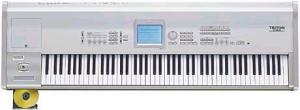 |
If it is a keyboard that you intend to use, don't short-change in this area. For good MIDI, a quality keyboard is essential. There are four general classes of keyboards: dummy keyboard controllers, dedicated pianos, multi-timbral keyboards/synthesizers, and workstations. The dummy keyboard or keyboard controller is the simplest input device. It is a fully weighted and balanced piano keyboard with MIDI output but no sound. Dedicated pianos typically have no more than eight piano or piano-related sounds, and often have their own amplifier and speakers built in. Many are inherently heavier than other keyboards. Multi-timbral keyboards and synthesizers have one or more banks of instrument sounds, and are capable of producing multiple layers or channels of sound. Workstations have the added bells and whistles of a built in sequencer that provide an all-in-one MIDI recording/playback device. If you can afford the full 88 keys in any of these configurations then go for it. This applies particularly to ragtime music, which in most cases requires more than the 61 keys of lesser keyboards. You may also consider getting a basic 88 key digital piano with one or more external sound modules for instrumental sounds. Also look for touch sensitivity, knowing that both spring controlled and weighted keyboards are available. Some even emulate the two-step feel of real piano hammers. The latter variety are most like a piano in feel and response, but may not be best for reproducing other instruments.
A Yamaha Disklavier™ piano that records and plays back MIDI signals using a real piano action.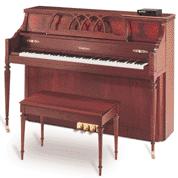 |
An alternative similar to the digital piano is the MIDI piano or a MIDI conversion kit for an existing piano. You get the touch and sound of a real piano with player-piano like capabilities in terms of MIDI. It sounds appealing, but the MIDI sensors on these pianos need regular calibration in conjunction with the piano's normal reaction to its environment. Recording methods and results from such a piano largely depend on the acoustic environment in which it is located and recording microphone quality, whereas a digital piano records with consistent sound quality. MIDI pianos also do not allow the flexibility or touch that a keyboard will in terms of emulating instruments other than piano. They are inherently expensive, currently adding a minimum $1,000 to the cost of the piano alone.
If you want to do more than just record piano tracks then there are some controls and capabilities that you will want included with your keyboard. These include direct MIDI patch access, micro-tuning capability, a pitch bender/modulation wheel, and an expression (volume) pedal. You should have a minimum of one MIDI In and MIDI Out port on the device, and optimally a MIDI Thru port which passes on the unaltered MIDI In signal. A second MIDI Out port may yield some advantages depending on your setup. There are other MIDI input devices including those designed for guitars and electronic wind instruments, as well as some audio signal converters. All of these are designed to convert the incoming audio signal or pulse into a usable MIDI signal, thus allowing you to play a banjo using a guitar, or emulate horns with an electronic sax or clarinet. You also gain advantages offered by these instruments that are usually unavailable to a keyboard, such as string bending, controlled slides, or wind embouchure.
Playback Devices: An output device is something that processes a MIDI signal into audible sound. As discussed above, some input devices also contain the elements of an output device, but there are many stand-alone output devices. Computer users are most familiar with the sound card.
A Roland Multi-Timbral Sound Module with synthesis capabilities, going far beyond anything heard by early ragtime performers!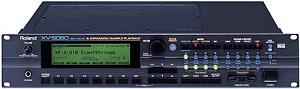 |
Dedicated MIDI users likely own one or more multi-timbral sound modules, which are able to reproduce nearly any instrument sound (and some synthesized sounds) concurrently on multiple channels. Output devices generally reproduce sound through one of three methods:
Synthesis, or the creation of sound from a combination of waves or a wave table;
Digital processing, which processes and plays back a digitally recorded and stored sound;
Soft sound, which is similar to Digital processing, except each note is played back from a bank of sounds loaded from a file. The last method applies mostly to advanced 32 or 64 bit sound cards and digital samplers. Some external devices also contain built in sequencers for recording and storage, making them pseudo-workstations, since they do not include the keyboard. Since all of these devices have diverse sound qualities for different timbres, the one you choose should contain a pleasing combination of the sounds you use the most. For example, I prefer Roland strings and percussion, Proteus horns, and Korg pianos, so I own a variety of devices for reproducing these various sounds. Note also that if you plan to do any CD production from your computer, you will want a digital sound card or USB/FireWire connected device with a high-end analog or optical input. These typically run $400 and above currently.
An aspect of output that should never be overlooked is the method of audio amplification used for your setup. Don't expect realistic sound from your average set of computer speakers. If you are tied to using a computer sound card for reproduction, invest in a computer speaker system that has an external subwoofer. Otherwise, a component high fidelity system is your best bet for a home studio, even for piano-only sequences. If you take your show on the road, a decent 10" or greater two-speaker system with a minimum 100 watt amplified mixer or head is acceptable for most small auditoriums. Anything above a 300 seat room warrants use of the house sound system, or a rented system if nothing else is available. No matter where you are listening, don't short change your sound reproduction methods as they can actually have an effect on how you create MIDI files.
A screen from Cakewalk home studio, combining MIDI with digital audio recording and production on your PC.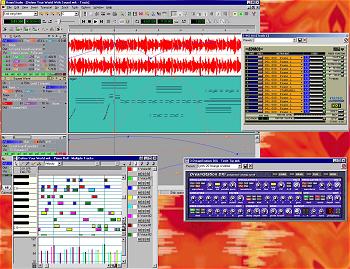 |
Sequencers: A sequencer is a software driven device or software program that records a MIDI signal and allows you to edit individual notes and performance parameters, then save the performances for playback. For computers, this is usually a program such as Cakewalk. Sequencer programs vary in quality from simple 16 track bar displays to programs such as Finale which are capable of accurately printing out music from the MIDI input. Computer sequencer programs usually allow a wide diversity of viewing methods for information, ranging from textual representations of note parameters to graphical views of tempo.
Cakewalk is currently among the most widely used sequencing software, and advanced versions of this program can also print very presentable music. If printing is a capability you desire, expect to pay a little extra for it. Other enhanced features include varying synchronization algorithms for video and motion picture film, as well as the synchronized inclusion of sound files, and a variety of software triggered events. Sequencers are also available as a component of keyboard workstations and as stand-alone hardware devices. Both of these usually have a limited alphanumeric display that allows viewing of one note at a time, but they otherwise contain the same mass editing capabilities of their computer counterparts. They also provide portability, an advantage that is discussed below. Most software sequencers and many external sequencers can create PC compatible standard midi format (SMF) files.
With a sequencer you can record multiple tracks of information, such as the instruments required to reproduce a Traditional Jazz band, or the left and right hands of a piano rag. Some sequencers allow you to redirect any of the sixteen channels of information to multiple output ports, so you can utilize different output devices without running all MIDI signals through all devices. Sequencers also allow you to edit note parameters, remove bad notes, add missed notes, change dynamics for a note or range of notes, insert or delete measures, alter tempos, and a variety of other music management chores. In essence, a good sequencer gives you the power to create almost anything you want. But don't let this fool you into thinking that it can correct poor playing, as the quality of the end product largely depends on how well it is played to begin with.
Portability Vs. Studio: For the most part, your MIDI setup will be either one of permanence or portability. A desktop PC centered workstation, or anything directly integrated into a MIDI keyboard creates less portability. Add in rack devices such as digital delays, compressors, and DAT (Digital Audio Tape) or hard drive/flash drive recorders, and you'll find yourself doing virtually all of your recording in the same place. I don't mean to imply that keyboard workstations are not portable, but my older digital piano alone weighed 115 pounds, and my current one around 50. The older one used to go places with me, but not without a lot of groaning and effort. External sound modules and sequencers can contribute to portability. When I play gigs I like to take my "band" with me, as I have produced a number of pre-recorded accompaniments for Ragtime songs. My sequencer and two sound modules easily fit in a gig bag, and require only a piano on the stage and some amplification to create the desired effect. Add to this the ability to control the starting and stopping of sequences with a pedal and it's easy going. If you prefer to keep everything in place in your studio, I recommend getting a DAT or hard drive/flash drive multi-track recorder to record your sequences digitally, so if you use them when you perform out you will still have a modicum of control and accessibility not available with standard audio cassettes.
There are many ways to approach how a MIDI file can be produced. Each has advantages and disadvantages, depending on the tools used and the musical capabilities of the individual using them. When deciding for the first time how you want to approach MIDI production, or if you feel like you need a change in methodology, it is helpful to remember the GIGO theory: Garbage In, Garbage Out. In other words, look first at the end result you hope to achieve, then learn and utilize the method which will obtain that end result in conjunction with your current playing ability.
If your MIDI tool set is limited or you are less secure in your musical abilities, you may be happy with just recreating the notes on the page to give you a better perspective on how a piece could sound. From there you can play with tempo and dynamics to some extent to map out expression. You may not get hand played or "live" results, but your recording could act as a template for a piece you are learning. If you are using a mid-range MIDI keyboard and sequencer program, you have more flexibility in what you produce. Even if you are not recording in real time or real tempo, you will have more control over dynamics, and can create a somewhat realistic tempo mapping if you are recording metronomically. If you have a full keyboard with both piano and keyboard sensitivity settings (there is a difference between the two in reference to key acceleration principles), and a full-featured sequencer program or hardware sequencer, you can create pretty much anything within or slightly beyond your current musical abilities.
Before you use any of the following methods, realistically analyze the end result you desire and/or feel that you can achieve. This may save much frustration, heartache, and time. Over time, you will acquire the ability to churn out not just piano-based files but fully orchestrated arrangements. The end result will nearly always be your reward for the amount of effort you put in. At any time during this process you run into specific snags, please refer to this page, or you may write to me by clicking on head in the top frame. Again, remember GIGO, and try to enjoy the creation process with the end result in mind.
Basic: Tools required for this method are a MIDI capable PC; music printing software or a basic sequencer; and a mouse, computer keyboard, or MIDI keyboard. This method essentially produces a piano-roll like representation of the sheet music.
With the software open, make sure you are in a staff or piano roll view. Set the time signature to match your printed music. Then start clicking or pressing away to add notes, using the note input method outlined in the manual for your software. Be careful to include all rests and repeats as printed. Go back and add accents and dynamics for a more accurate presentation.
Advantages: You only need a rudimentary understanding of music and the software you are using. For a person who is not MIDI keyboard capable, this will be the fastest method. It is easier to see and correct mistakes than with some other methods. You may also learn enough over time to apply your own creative muse and write an original piece, then have the advantage of being able to print it out for others to view or play.
Disadvantages: Most dedicated music printing software has limited playback and interpretation capability. The same is true for sequencer programs when the notes are put in through the keyboard or by mouse. When playing back printed music, notes will typically sound for 80% to 100% of their designated length, creating a possibly undesired legato effect that comes across as unnaturally smooth. All of the notes will be quantized, which means that they will fall exactly where printed within a measure instead of approximately, as a hand played recording would. Dynamics will likely be limited to literal representations of what is contained in the file, and crescendos/diminuendos are rarely utilized. It will sound mechanical and expressionless for the most part. There are a couple of programs that allow playback using the original MIDI input expression, or will interpolate it into a hand played sound through a de-quantizing process, but when creating a piece one note or chord at a time, this could result in uneven or stilted playback.
Step: A similar method to the one described above is often times referred to as Step Recording. Tools required for this method are music printing software or a basic sequencer, or a hardware sequencer, all used in conjunction with a MIDI keyboard.
Instead of entering notes with the mouse or the computer keyboard, a MIDI keyboard is used. The MIDI pointer is set initially to 0:0:0, and an increment must be set for the amount of time to step between notes. For example, on a piano rag you would likely set an increment of sixteenth notes. Then play the note or chord which aligns with the current location of the pointer. In other words, if you are on the second beat of the third measure, the MIDI pointer should be at 3:2:0 or a similar reading. Each time you have finished playing the note or notes that align with this location, press the Enter (or similar) key to advance the MIDI pointer to the next increment. Press Enter again to skip an increment where there are no aligned notes.
Advantages: You only need a rudimentary understanding of music and the specific steps required by the sequencer or sequencing software. This method is somewhat faster than computer keyboard or mouse entry. When using a software sequencer it is easier to see and correct mistakes than with some other methods. You also have the advantage of hearing chords as they are entered, rather than having to play them back after clicking them in one note at a time. You also gain more control over the dynamics as you can enter notes at varying volumes on a touch-sensitive keyboard.
Disadvantages: The entered notes are often adjusted to play only for the incremented time, which creates a choppy sound on playback. Alternately, they may be adjusted to sustain until the next note entry point, creating a continuous legato sound. In some cases they may all be adjusted to one predetermined length. In all cases, this requires extra editing to readjust undesired note lengths, which may end up consuming more time than other entry methods. As with the Basic method, all of the notes will be quantized, which means that they will fall exactly where printed within a measure instead of approximately, as a hand played recording would. It will sound mechanical for the most part, and will require extra tweaking to interpolate it into a hand played sound through a de-quantizing process, although this could result in very uneven playback depending on note lengths.
Metronomic: Tools required for this method are a MIDI capable PC with a sequencer program or a hardware sequencer; a sound card with MIDI channel 10 percussion or a metronome on the hardware sequencer; and a MIDI keyboard. This method can create a more realistic interpretation of your music, but still has constraints in terms of rubato or tempo expressions. You will need to be capable of playing one or both hands of the printed score against a metronome beat.
Most sequencers are capable of starting either when a key is played or with a one to two measure countdown. Determine which method is best for you. The metronome beat will either come from a speaker beep or a percussion sound on channel 10. Set the metronome to a speed at which you can comfortably play, even if it is only for two to four measures at a time. Play against the beat with either one or both hands until you reach a point where you feel you need to stop before continuing. If you have the option of keeping or throwing out a take, be careful in your choice. If you have the capability of recording a single channel on multiple tracks, record on track two or higher, then merge each successful take with track one so you won't inadvertently erase or record over completed material.
When you are done, you can go back and correct bad notes, add missing notes, and correct timing problems. Depending on how accurately you play against the metronome, the results may need to be quantized, or software-corrected to the nearest note increment of your choice, which could remove some of the realism. Try to avoid quantizing if possible, as more often than not it sounds mechanical, and many notes may end up moved forward or backward to the next closest increment. If your software allows for some variance of note placement in the quantizing process, learn it and take advantage of it. When the necessary corrections have been made, take the tempo up to one that is desirable, and alter it where necessary to account for rubato, fermatas or other tempo changes. In most cases, the end result will successfully import into a music printing program for viewing or printing.
Advantages: If you are musically inclined, this may produce faster results than the Basic or Step methods. It will also create a more hand-played sound, albeit with some limitations. Playing against a slow metronome also tends to improve your playing in general, as well as repeating a section over and over until it sounds right. Therefore, this method also encourages good practice habits. You ultimately have more control over the dynamics, pedaling, and note lengths than with the Basic or Step methods. If you are using the hands separate entry, you can divide the hands between two tracks for a more accurate interpretation of your playing when imported into a music notation program.
Disadvantages: You are limited to metronomic constraints, and creating rubato effects with a tempo track or through tempo mapping can prove to be extremely difficult in terms of getting desirable results. In most cases, you will learn very quickly just how accurate or inaccurate your note timings are, particularly if you quantize your performance and end up correcting a lot of misplaced notes. When playing slower or using both hands to play the notes for one hand, you are more likely to hold the notes down for a longer time than you would at tempo, creating more of a legato effect than may be desired. The same is true for pedaling. Importing your performance into music printing software may require further editing due to literal interpretations of note lengths, and will likely result in a visual cacophony of dotted notes with lots of miniscule rests interspersed throughout. Some programs do have a filter that can correct this condition.
Real Time: Tools required for this method are a MIDI capable PC with a sequencer program or a hardware sequencer, and a MIDI keyboard. This method will create the most realistic interpretation of your playing, and is constrained only by your individual musical abilities. (Note: This is the "Perfessor" Bill Edwards method of MIDI recording, and is utilized in similar fashion by any number of other professional musicians.)
For starters, you need to be relatively familiar with the arrangement of what you are recording, if not intimately so. Refer to the GIGO theory noted above. Once you feel you are ready to record, forget about the metronome. Set the tempo to the default of 120 or 100, depending on your software, and make certain that the metronome sound tick level is turned down or off. Set the time signature to a default 4/4 for reference. Before you record, play through your piece a couple of times to establish the tempo you will use.
Start recording the piece in real time or as close to tempo as possible. Play at least a few measures at a time if you can't get through the whole piece or even a section of the piece. If you have the option of keeping or throwing out a take, be careful in your choice. If you have the capability of recording a single channel on multiple tracks, record on track two, then copy each successful take to track one so you won't erase or record over completed work you want to keep. By using multiple tracks when you are recording in sections, once the first part of the track has been laid down you can back up to a starting point at least two or more logical measures, which are measures within the context of the music and not the sequencer. Then allow those measures to play back on track one while recording on track two so you will have the correct tempo, dynamics, and feel at the point where you jump in and pick up the recording again.
When you are done, or alternately between recording sections of your piece, you can go back and correct bad notes, add missing notes, and correct timing problems. Quantizing is not an option with this method, so be confident of your rhythmic timing before you even begin. When you are done playing and editing notes, you may want to adjust the tempo track to account for overall tempo changes while playing a piece. A large number of ragtime musicians tend to speed up a little during performance, so adjusting the tempo contrary to speed changes may help to ensure a consistent tempo throughout.
To alter the dynamics or other attributes of selected logical measures (measures within the context of the music), use the following method: If you cannot select a range from one specific note to another, and can only select a range of MIDI measures or MIDI beat boundaries within MIDI measures, this method will help with the alteration process. Find out which beat of what MIDI measure the starting note of the desired section is closest to, preferably on or just after that beat. Then temporarily alter the time signature for that MIDI measure so that the starting note becomes the first note of the next MIDI measure. For example, if the starting note for the section you want to alter falls on 42:3:17 (MIDI measure 42, beat 3, clock tick 17), alter the time signature for MIDI measure 42 to 2/4. The starting note will now fall on 43:1:17. Similarly alter the MIDI measure that contains the ending note of a section so that it is the last note within that MIDI measure. Now you can do large scale editing operations on that section without altering notes that fall outside of it. When done, change the time signatures of the altered MIDI measures back to 4/4 if desired.
To re-record measures or insert new ones, use the following method: Playing out of metronomic tempo can create nightmares when re-recording a section without altering what comes after it or when. You may record on another track along with the section of music to be replaced, but this creates problems with hearing note repetition and general confusion about the sound that is coming out. For better results when re-recording a section, or even to add a section where one did not exist before, insert at least 50% more in the way of MIDI measures than you think you will need. Then start recording using the process outlined above. When you are done, adjust the time signature of the inserted MIDI measures between the ending note of what you just played and starting note of the next music block so that when the MIDI measures in-between are deleted, you will be within an eighth note or so of the proper rhythmic timing. Then use a slide edit or whatever capability exists in your sequencer to offset the notes from the end of the insertion point to the end of the piece, sliding the proper number of clock ticks required to synchronize and maintain a proper rhythm.
Advantages: If you are musically inclined, this method will produce faster results than the Basic, Step or Metronomic methods. It will yield a more realistic "live" sound, with the only limitations resulting from your playing or editing abilities. Repeating a section over and over until it sounds right will also improve your overall performance of the piece in the future. You ultimately have total control over the dynamics, pedaling, note lengths, and tempo expression.
Disadvantages: As stated above, your results are limited to your playing and editing abilities. Therefore, if either or both are limited or questionable, this can quickly become an extremely time-consuming and mood altering methodology. Mass editing and the location of starting and ending points becomes more difficult than with other methods because of the lack of clear logical measure boundaries. Importing Real Time files into most music printing programs and editing them to make sense is extremely difficult or close to impossible, ultimately depending on your skill and patience levels.
Orchestration is such a broad topic that I will only attempt to outline the implementation of it in MIDI. Since the combination of instruments, playing styles, rhythms, etc. is usually a matter of personal taste with a set of very wide-ranging guidelines, it is inappropriate for me to insist that my way is
the way and will work for you. It may, or may not. I have been creating MIDI orchestrations for the better part of two decades in genres that range from classical orchestra for
Handel's Messiah to Contemporary Christian Rock and Top 40 tunes. My Ragtime and Traditional Jazz band orchestrations make up a large part of that work, but are by no means inclusive. I suggest that you also branch out, using the ideas here, and try a wide range of musical styles. Perhaps you may attempt to emulate a recording you know of, or orchestrate a piece composed for solo piano. For ideas of just how far MIDI orchestration can be taken, including examples of Ragtime, Traditional Jazz, and Mariachi bands, I refer you to my vocal recording set,
"Perfessor" Bill Sings, Volumes 1 to 3. Since the orchestrations on these recordings were produced using multiple sound modules, they cannot be easily interpreted to a single GS MIDI sound card standard. Even if they were converted, many of the tracks require up to 60 notes of polyphony to work, which is beyond the range of most sound cards, and why I instead refer you directly to the end result. For methodology on the mechanics and accepted practices of orchestration in any musical style, I refer you to your local bookstore or library, or even a thorough listen through your CD or tape collection.
Read, listen, absorb, apply.
- Map it out first: Have at least some idea of what it is you want to do to enhance your piece with orchestration, and make sure it is appropriate to the style of music you are reproducing. This is, of course, a matter of personal taste. You can't always hear the completed work in your head, but imagine it as best as you can, keeping in mind that you can always make alterations as the recording process progresses. Decide what instruments you want to use, including foundation (bass or tuba), harmony (wind or brass), fill (guitar or strings), and percussion. Try to avoid conflicting timbres, or using instruments that will not balance with each other. For example, bagpipe and lute are at extreme ends of the audio spectrum in terms of volume and tone. They will not mix. One more thing that is harder to do at first, but becomes easier after time, is to consider the polyphonic limitations of your equipment, which is the number of instrument notes your device can produce simultaneously. If you are using the same module to produce piano in addition to all of the other instruments, you will run out of notes rather quickly. If you are using external modules or a sound card in addition to a digital piano, you will have a great deal more flexibility without exceeding the polyphonic capabilities of your equipment.
- Recording: When you are ready to record, make certain you start with... Actually, that depends on the rhythmic context of what you are doing. When recording something rubato, such as Asleep In The Deep, I will start with the piano part first, then synchronize the other instruments with it, using the Real Time method outlined above. Otherwise, I use the Metronomic method, also outlined above. I will usually commence by laying down the rhythm tracks first, starting with bass or tuba and then adding drums, before proceeding to the recording of other instrumental parts. When they are completed, I will add the piano last. It contributes to the spontaneity and continuity of performance if I'm playing along with the other instruments, rather than in anticipation of them. Adjustments can be made at anytime using the methods listed in the previous sections.
- Some Orchestration Tips:
- Be consistent with your track assignments. For example, try to keep the bass, drums, strings, piano, etc. each on their own track and/or MIDI channel and use that track and/or channel consistently for all of your recordings if possible. This will speed up the process as you advance.
- Remember to always include your initial instrument or bank patches and exclusive/control changes before saving and moving on. Otherwise, you may hear an unexpected instrument or drum set play the next time you load up a song. I usually leave a blank measure of 1/4 or 2/4 and put all of the assignments in track one, allowing time for the changes to take place. Some sequencers will set the assignments as the file as loaded.
- One thing that really bothers me about many MIDI orchestrations I have heard is that the performer has little or no concept of the instrument or instruments they are trying to reproduce, creating an artificial sound. Learn something about the instruments you are reproducing and how they are played. Remember that violinists need to change bow direction, and that wind players need to take a breath on occasion. Most bass players don't just play what is written for the left hand; they include passing tones and little riffs throughout, and occasional string slides. Guitars and banjos are strummed, rather than all strings played simultaneously.
- If you can avoid using canned rhythm patterns or quantizing your percussion track, your sound will ultimately be much more realistic. Learn which keys play which drum and percussion sounds. This percussion mapping should be consistent with all GS MIDI instruments, and you will become a decent drummer with just a little practice on the keys. You can also make several passes at the percussion track if you wish. This will obviously create a somewhat larger file than a rhythm track would, but the end product is usually worth the extra bytes.
- AAC
- Advanced Audio Coding, a standard for minimal lossy digital audio compression that allows for emulation of wave format in a much smaller form. This is currently the standard used for iTunes and many other streaming/download audio sites.
- AD/DA
- Analog to Digital or Digital to Analog, designating which process is in use. For example, from a CD to a tape would be DA or Digital to Analog. Many CDs have three letters on them (such as ADD) denoting the method used for the recording, mastering and distribution processes.
- Aftertouch
- A MIDI message that is generated by pressing down harder on a key after the initial key on message has been received. Channel aftertouch (CAF) affects all notes in the current channel regardless of which one is pressed. Polyphonic aftertouch (PAF) affects only the notes generating the aftertouch message.
- Analog
- A method of recording or playback that stores and reproduces sound waves through magnetic impulse reproduction, which inherently introduces anomalies, artifacts, and electronic noise of varying degrees. Records and Cassette tapes are considered analog media.
- Bank
- Refers to a group or bank of instrument sounds in groups of 64 or 128 different sounds or patches.
- Blu-Ray
- The Sony version of a High Definition Digital Versatile Disc, a digital storage medium the size of a compact disc that can be recorded onto one time with 24 bit audio, high definition video or data, such as MP3 files. These units require a Blu-Ray laser, unlike the red laser for standard CD and DVD discs. Blu-Ray DVDs support high-definition video resolutions of the 1024p HDTV standard as well as multiple channels of high-resolution 24 bit sound of up to 7.1 channels. They also have enormous sound file storage capacity. There are consumer-recordable 4k Blu-Rays available in the near future, but that technology is still very expensive and home recording devices for this format are far from common as of 2016.
- CAF
- Acronym for Channel Aftertouch. See Aftertouch.
- CD/R
- Acronym for Compact Disc Recordable, a blank compact disc that can be recorded onto one time. You can use either a computer CD recorder for data and music, or a dedicated audio CD recorder to make CD copies or record music only. A CD/R can be recorded in one or more sessions, but cannot be played until it is closed, after which it can no longer accept data. Maximum storage time is currently 80 minutes or 750 mb.
- CD/RW
- Acronym for Compact Disc Recordable Writable, a blank compact disc that can be recorded and rewritten multiple times. You can use only a computer CD rewriting recorder for data and music. Music can be stored in the form of Wave or MP3 files. Some devices allow you to record onto a CD/RW in multiple sessions rather than all at once. Maximum storage time is currently 80 minutes or 750 mb.
- Channel
- Refers to a digital band on which MIDI broadcasts. MIDI is designed for 16 channels, but many devices have up to 16 output ports, creating a possible 256 channels of output in 16 channel increments to 16 different devices.
- Control Change
- A MIDI message that determines the current state of control parameters, such as volume, left to right pan, sustain pedal, soft pedal, etc.
- DAT
- Acronym for Digital Audio Tape, a form of tape media that records digital signals on a small cassette with storage lengths of up to 3 hours.
- Digital
- A method of recording or playback that stores and reproduces sound waves through absolute binary impulses, which lessens or eliminates the need for equalization and adjustment, and will not introduce noise or signal deterioration through various generations of recording. CDs, DATs, Hard Drives and MiniDiscs are considered digital media.
- DVD-R/DVD+R
- Acronym for Digital Versatile Disc Recordable, a digital storage medium the size of a compact disc that can be recorded onto one time with audio, video or data, such as MP3 files. You can use a computer DVD recorder for data and music, and some more advanced units to store synchronized digital audio and video. Music can be stored in the form of Wave or MP3 files, or part of a video soundtrack on multiple channels. Maximum storage time is largely dependent on the resolution or overall quality of the data being stored, with higher resolutions yielding smaller storage times. The DVD-R has less resolution capability than the DVD+R, which yields better results at lower resolutions.
- DVD/RW
- Acronym for Digital Versatile Disc Recordable Writable, a blank DVD disc that can be recorded and rewritten multiple times. You can use only a computer DVD rewriting recorder for data, music and video. Music can be stored in the form of Wave or MP3 files, or part of a video soundtrack on multiple channels. Some devices allow you to record onto a DVD/RW in multiple sessions rather than all at once. Maximum storage time is currently 240 minutes for video or 4.7 gb.
- Event
- Refers to a single MIDI message. This can include note on, note off, volume changes, pitch bends, etc.
- Exclusive Message
- A MIDI message that is specific to a particular device by a particular manufacturer. MIDI exclusive messages are recorded from the device they are meant to address, and are encoded so that they will be ignored by any device that did not create the original message. See System Exclusive Message.
- GIGO
- Acronym for Garbage In, Garbage Out.
- GM
- Acronym for General MIDI, a protocol designed for multi-timbral MIDI devices and sound cards that assigns a set list of instruments to common instrument patches, so that MIDI sequences will play expected instrument sounds on any GM compatible device. See also XG MIDI.
- GS MIDI
- Acronym for General Standard or General Synthesizer MIDI, an extension of GM protocol designed by Roland for multi-timbral MIDI devices and sound cards that assigns a set list of instruments to common instrument patches, so that MIDI sequences will play expected instrument sounds on any GS compatible device without remapping. GS may also be applied through patch mapping capabilities of some computer operating systems, and there is a standard set of effects and alternate sounds. See also XG MIDI. --GS MIDI Instruments-- --GS MIDI Percussion--
- HD/DVD
- Acronym for Toshiba's High Definition Digital Versatile Disc, a digital storage medium the size of a compact disc that can be recorded onto one time with 24 bit audio, high definition video or data, such as MP3 files. These units require a Toshiba-compliant player unlike players for standard CD and DVD discs, and are still a new consumer item, so recorders are scant. HD/DVDs support high-definition video resolutions of the 1024p HDTV standard as well as multiple channels of high-resolution 24 bit sound of up to 7.1 channels.
- HDR
- Acronym for Hard Disk Recorder, a digital recording device that utilizes a hard disk drive or Zip drive for data storage. These offer flexibility in track assignments and recording quality, as well as extended mixdown capability. Recording time varies with drive size.
- Input Device
- A device that generates MIDI signals directly from user input for broadcast to a MIDI sequencer or MIDI playback device.
- Live MIDI
- A term that applies to a MIDI recording of a real-time performance, rather than just a sequence of notes. This implies a more realistic or hand-played sound. See also Real Time Recording.
- Logical Measures
- Measure boundaries in relation to printed music, as opposed to measures according to the MIDI clock. See also MIDI Measures
- MD
- MiniDisc. See MiniDisc.
- Metronomic Recording
- A method of recording MIDI tracks synchronized to the internal MIDI clock metronome.
- MIDI
- Acronym for Musical Instrument Digital Interface, a digital protocol designed for electronic musical instruments and computers to effectively interface with each other using the same musical language.
- MIDI Channel
- An individual band in which notes are transferred to reproduce sounds from a single instrument patch. There are 16 channels available to MIDI. When redirected to up to 16 MIDI ports, there are up to 256 possible logical MIDI channels.
- MIDI Clock
- The increment of resolution used by a MIDI sequencer to determine note placement and length in relation to tempo. A clock resolution of 120 means that there each quarter note is divided into 120 clock ticks, and measure of 4/4 would be divided into 480 clock ticks. Common quarter note resolutions include 96, 120, 240, 480 or 960 clock ticks.
- MIDI In
- An input connection port that receives MIDI data from a MIDI input device.
- MIDI Measures
- Measure boundaries in relation to the MIDI clock as opposed to printed music. See Logical Measures
- MIDI Out
- An output connection port that broadcasts MIDI data to a MIDI playback device.
- MIDI Port
- An input or output connection that allows access to the MIDI capabilities of a device. A MIDI device may have several output ports to which individual notes on any channel can be directed, creating more logical channels.
- MIDI Time Code
- A code that can be broadcast to or from a MIDI device that signifies MIDI clock ticks for synchronization between audio and video recording/playback devices and MIDI instruments.
- MIDI Thru
- An output connection port that broadcasts unaltered MIDI data from a MIDI In port on the same device, ignoring any extra data that might be added by that device.
- MIDI Type 0
- A MIDI file protocol that contains a single track with all channel data in order of time. This is the earliest format and will play on most any MIDI device.
- MIDI Type 1
- The current standard MIDI file protocol that contains a multiple tracks for MIDI data, and provisions for free form text or tag markers linked to any point of any track. This format will play on most modern MIDI devices.
- MIDI Type 2
- A MIDI file protocol can contain patterns, such as rhythm patterns or repeated measures. This protocol is rarely encountered as it requires special software to reproduce.
- MiniDisc
- A form of laser media that records digital signals on a small direct-access disc with single channel storage lengths of up to 160 minutes (80 for stereo) and full titling capabilities. There are several MiniDisc workstations available that allow multi-track recording for up to eight separate digital tracks.
- MP3
- Acronym for MPEG Audio Layer-3. A compressed digital audio coding scheme used to distribute music through the internet for playback on computers or MP3 players. See also MPEG and WMA.
- MPEG
- Acronym for Moving Picture Experts Group. A group of software designers that created compression formats used for MPEG motion video files and MP3 audio files. See also MP3 and WMA.
- MTC
- Acronym for MIDI Time Code defined above.
- MTS
- Acronym for Multi-Timbral Sound Module defined below.
- Multi-Timbral Sound Module
- An external device or dedicated MIDI sound card that is capable of reproducing one or more instrument sounds concurrently on separate MIDI channels.
- Multi-Track Recorder
- A recording device with microphone and line inputs that is capable of recording and playing back four or more tracks of sound simultaneously, allow the recording or playback of single tracks, and allow for the mixing of all tracks into one or two channels. Common multi-track recorders utilize Cassette tape (analog), Reel to Reel (analog/digital), MiniDisc (digital), or a Hard Disc Drive (digital) as storage media.
- Output Device
- See Playback Device
- PAF
- Acronym for Polyphonic Aftertouch. See Aftertouch.
- Physical Measures
- See MIDI Measures and Logical Measures.
- Pitch Bend
- A MIDI message that changes the current pitch of a note up or down based on a ratio between the current level of bend (-128 to +128) and the maximum allotted bend for the current instrument. An instrument with a bend range of +2 and a pitch bend signal of -64 will sound 1 chromatic step lower than the intended pitch for that note.
- Playback Device
- A device that receives MIDI signals and interprets them into instrument note sounds for audible reproduction.
- Program Change
- A MIDI message that determines which instrument patch, or in some cases, preset configuration of instruments will be set for sound reproduction.
- Quantize
- A process that corrects misaligned note placements to the nearest user-selected increment, such as a quarter, eighth, or sixteenth triplet.
- Real Time Recording
- A method of recording MIDI tracks regardless of the metronome setting which reproduces an original performance with all tempo alterations intact.
- Sequence
- A file that contains MIDI data necessary to play back a performance using a MIDI output device.
- Sequencer
- A software driven device or software program that records a MIDI signal and allows editing of individual notes and performance parameters for file storage and playback.
- SMPTE
- Acronym for Society of Motion Picture and Television Engineers, which has set standards for MIDI synchronization algorithms and performance in film and video.
- SMPTE Time Code
- General term for a MIDI time format designed for MIDI synchronization with 24 frame per second film and 30 frame per second film and video. Several subformats of the overall protocol are currently in use.
- Sound Card
- An internal device card designed for a personal computer that is capable of reproducing sounds via MIDI input, wave input, or other forms of computer files intended for sound reproduction. Most sound cards have some form of low-power internal amplification.
- SYSEX
- Acronym for System Exclusive defined below.
- System Exclusive Message
- A coded message format that is hardware specific, and intended to initialize or alter settings on a specific piece of MIDI hardware without affecting other MIDI hardware. See Exclusive Message.
- Velocity
- The measured rate at which a key is physically struck, which determines both volume level and attack parameters of a note.
- WMA
- Acronym for Windows Media Audio. A compressed digital audio coding scheme used to distribute music through the internet for playback on computers or WMA players. It is a different compression algorithm than MP3 yielding similar results with smaller file sizes. See also MP3 and MPEG.
- Workstation
- An integrated set of MIDI components including a multi-timbral sound module, sequencer, and a keyboard.
- XG MIDI
- Acronym for Extended General MIDI, an extension of GM protocol designed by Yamaha for multi-timbral MIDI devices and sound cards that assigns a set list of instruments to common instrument patches, so that MIDI sequences will play expected instrument sounds on any GM or XG compatible device. See also GM and GS MIDI.
In my vast archive of recordings, I have a 1980 interview of Dennis Wilson, the drummer for the Beach Boys and brother to both the band's founder Brian and lead guitarist Carl. In it he states that one of his greatest wishes for the world is that someday, everybody would have a recording studio of some kind in their home, and they would be able to experience the joy of producing music to their liking. Getting my start in the Los Angeles music scene in the 1970s and having had the privilege of meeting and talking to Denny on a few occasions, I know that even though this was one of his last wishes, it was a very sincere and passionate one. If he were around in this age of Digital recording, MIDI recording, the World Wide Web and personal computers, I think he would see his wish coming to fruition. Please remember that most of the time the sheer joy of creating is the reason for creating to begin with. For me, it is a necessity to create as I have so much music in me trying to get out. I would call it a labor of love, except that there is little perception of labor on my part. For you, it may be simply a leisure activity or a convenient method of learning. No matter what, remember Denny's wish; that you derive pleasure from both the process and the end result. That is a large part of the essence of music, the part of ourselves we put into it. That is what the listener will take away from it as well. I wish you the best in your efforts!






 Loading Page. Please Wait...

 Player Pianos
 Ragtime and MIDI



 Click here for more space
  Click here to expand menu